
Your Offer
- Value
- 0
- Price
- 0
- Demand
- –
Their Offer
- Value
- 0
- Price
- 0
- Demand
- –
Add items to both sides to compare
Ever closed a trade window and felt that little sting ten minutes later? Most traders have. The other player was rushing you, the chat was moving fast, and you said yes to a deal your gut already doubted. This free browser tool fixes that habit. Load up both sides, watch the live totals, and read the W/F/L verdict before you confirm anything in-game. No signups. No downloads. No login.
Here is the real problem with trading in Blox Fruits: Roblox never gave the game a built-in value system. Shop prices exist, sure, but they tell you nothing about actual player valuations. So our calculator aggregates what items really close for. That covers physical fruits, permanent fruits, gamepasses like Dark Blade and Fast Boats, plus limited event items. It compares your offers with theirs and gives you a straight answer on fairness.
What Is the Blox Fruits Calculator?
Think of it as a second opinion that never sleeps. Rarity charts only show base rarity. This tool goes further. It weighs demand and current trading activity, the exact signals the meta runs on, and turns them into one honest valuation for each side of the trade window.
Why does that matter so much? Because scams feed on missing information. When you can see in plain numbers what each side is worth, you start making informed trading decisions instead of emotional ones. The players who hunt guesswork simply move on to easier targets.
How to Use the Calculator
Honestly, you can skip the manual and just try it. Hit Add Item under your offer. Search by name or flip through the type tabs in the picker, then add items one tap at a time. Now do the same on the opposite side for their offer. There is no item cap here, so bulk trades fit without any workarounds. Those are all the steps there are.
The moment items land, the bar moves and the verdict updates instantly with exact value differences. Review the numbers and decide: execute the swap in-game, send a counter-offer, or just walk away. Want backup first? Open the Trade Checker to share your exact setup with a friend, or browse the full values list to double check one item.
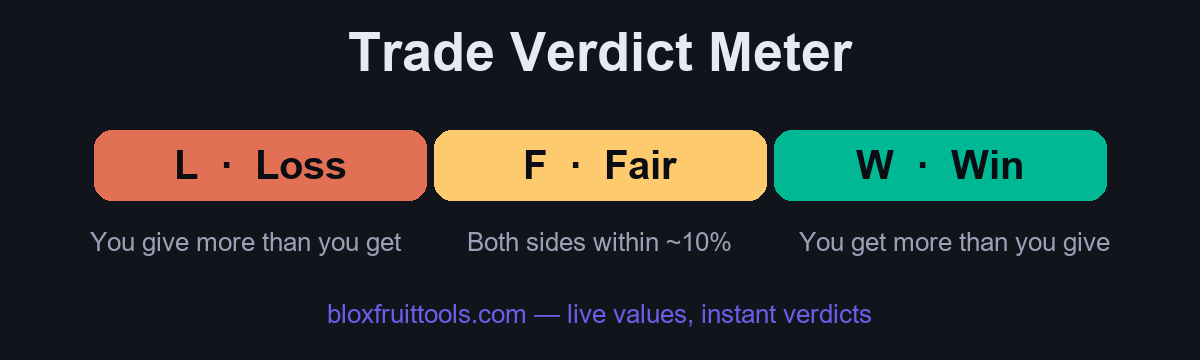
What Does W/F/L Mean in Blox Fruits Trading?
Three letters, one decision. Win means the total value coming your way beats what you give by a real gap, so the trade favors you. Loss is the mirror image of that. Fair sits in the middle. Both sides land within roughly ten percent of each other, and inside that threshold either trader could reasonably accept. You will also hear huge W and huge L in community chat when the gap gets embarrassing.
One thing most guides never tell you: a verdict can be a Win mathematically and still fail you practically. If the fruit on offer does nothing for your build or playstyle, a safe Fair trade for something you will actually use beats a paper profit every single time. Trust the numbers first, then your judgment. Counter or walk away when the two disagree.
Demand Ratings (1 to 10) Explained
Trading is a marketplace, not a price chart, and the demand score is where that difference shows up. On our ten-point scale, anything at 9 or 10 is a meta fruit everyone wants. Those are easy to trade away in minutes because buyers outnumber sellers all day. The 6 to 8 range covers solid items that move at fair value without much drama.
Below that line, liquidity dries up fast. A 3 to 5 item is a slow mover, worth keeping only if you actually use it. And 1 to 2? Functionally dead. Difficult to shift even underpriced, because the requests just are not there no matter how many offers you post.
Physical vs Permanent Fruits
The most expensive mistake new traders make is treating both versions of a fruit as equals. They are not even close. Regular physical fruits are consumables. Once eaten or swapped, they disappear for good. A permanent fruit bought with Robux will stay on your account forever, lets you switch back whenever you like, and never leaves your inventory.
That utility creates a dramatic value difference. Perms are always the higher-priced asset, usually 2-3x more and far beyond that for the top mythicals. So before you compare any offer, check which version is actually on the table. A five second toggle of attention saves you from the classic perm-for-physical rip.
How Our Values Stay Accurate
Nobody here invents numbers. Consensus sets them, and we treat the community as the final arbiter. Our methodology mixes several weighted inputs: closing prices pulled from big trading Discord servers, direct verification of real trades, community submissions, and demand reports that show where trading activity actually flows.
The database gets a daily refresh to cover normal market drift. Big game updates, balance patches, and reworks get an emergency review with full recalibration, because one buff announcement can reprice a fruit before the servers even finish restarting.
Blox Fruits In-Game Trading Rules
The game itself enforces a few hard limits you should know cold: a maximum of four items per side in a single window, a cap on trades per window of time, and a rough Beli price difference cap that blocks wildly lopsided swaps before they happen.
Location matters too. Trading lives at the Second Sea Café and the Third Sea Mansion, always inside the official trade window. If someone tries to steer you anywhere else, they are not negotiating with you. They are setting you up.
Common Trading Scams and How to Avoid Them
Strip away the details and every scam is the same move: getting your items outside the trade window. The storage glitch story, where you send your fruit first and get it back doubled, is pure fiction. Same for the trade first promise, the fake middleman who is usually one of the scammer’s own alts, and the split trade where they vanish after the first half. Fake permanent claims and last-second swaps inside the window round out the classics. Watch the confirm screen, not the chat.
Off-platform is where it gets truly ugly. Cross-trading for real-world money is a ToS violation that kills every recovery option you had, and phishing sites asking for login credentials exist for one purpose only. The golden rule the community repeats for good reason: if it sounds too good to be true, it is. Run the deal through the calculator, and if a stranger is rushing you toward a massive Win, assume the catch simply has not surfaced yet.
Pro Trading Tips
Small habits compound. Prioritize demand over raw value, since a liquid item converts into anything while an illiquid one converts into waiting. Time trades around updates. Hold Perms through nerfs, sell Physicals before them, and stack boosts while grinding toward your next trade-up target.
At the table itself, ask for adds on uneven offers instead of rejecting them flat, and screenshot the final window before you confirm. None of this looks dramatic on day one. Run it for a month and your inventory will tell a very different story.
Frequently Asked Questions
Is the calculator free to use?
Completely. No account, no download, no signup, no premium tiers, and no usage limits. Check one trade or a hundred.
How accurate are the values, and how often do they update?
Values track community consensus from Discord trading hubs and verified trades, refreshed daily. Stable items stay tightly accurate, and the methodology section above explains every input.
What do W, F, and L stand for?
Win, Fair, and Loss. Either you gain value, both sides sit within a fair band so either side can accept, or you give up more value than you receive.
What is the difference between physical and permanent fruits?
Physicals come from shops and spawns and vanish once used. Permanents are bought with Robux, last forever, and let you switch freely. That is exactly why they trade so much higher.
Does the calculator support gamepasses and limiteds?
Yes. Dark Blade, Fast Boats, and the rest are fully supported, along with event items whose fixed supply makes their prices swing the hardest.
Why does demand matter more than value?
Because trading is a marketplace, not a price chart. High-demand items trade faster at full price, while high base value with zero demand just sits in your inventory.
Do I need a Roblox account to use this site?
No. Everything runs entirely in your browser, and no personal information is ever requested.
Can I share a trade with a friend?
Yes. Build it in the Trade Checker and generate a link. Whoever opens it sees the exact trade with both sides intact, whether that is one friend or your whole community.
Is this site affiliated with Roblox or Blox Fruits?
No. This is an independent, fan-made project, not endorsed by Roblox Corporation or the game’s developers. All trademarks belong to their owners.